Quotas overview
Cap how many respondents land in a particular cell. Quotas are defined through the platform's Quotas panel — a three-step wizard that folds existing `single` / `multi` questions into cell dimensions and stores cells, targets, and counts in the platform database. Scripts read the current cell state at runtime through a single helper: `quota(groupId, cellCode)`.
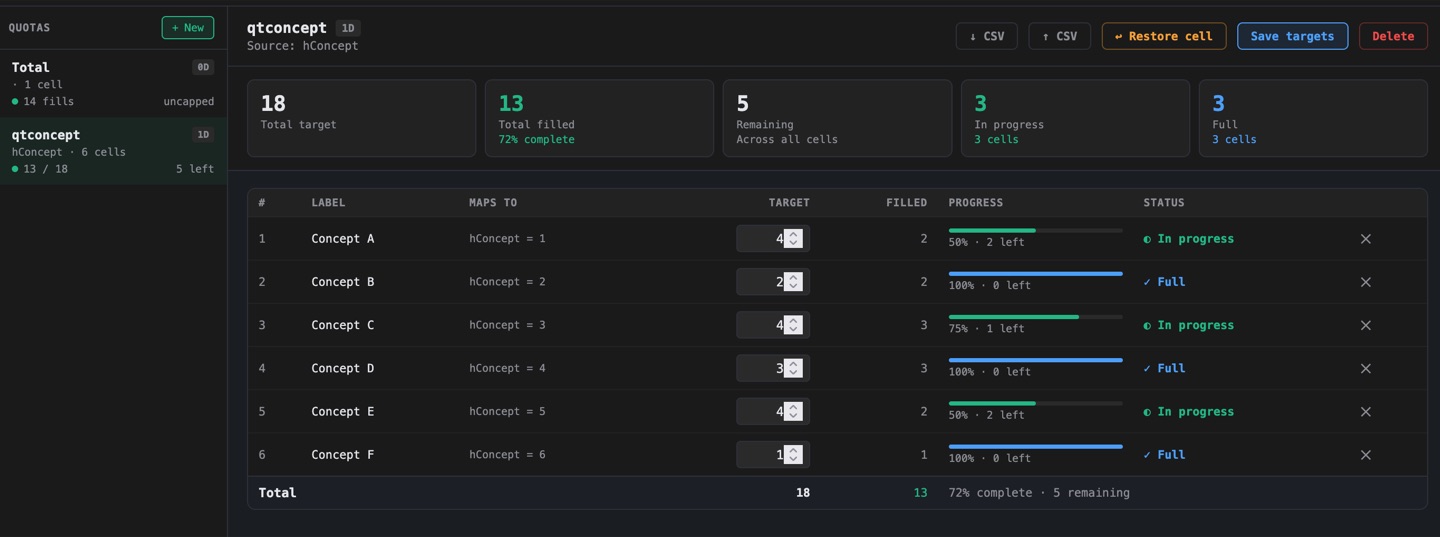
The Quotas panel — where cells get authored
Quotas don’t live in YAML — there’s no - quotas: block, no per-question quota: property. You author cells in the platform’s Quotas panel (a top-level tab in the shell), and your scripts read the resulting cell state at runtime.
A three-step wizard creates a group:
- Setup — group name, type (
singlefor one question’s options,interlockedfor the cartesian product of two or more), and the dimension question(s) the cells map to. The wizard reads your live question list —singlequestions becomeop: eqpredicates,multiquestions becomeop: includespredicates. - Preview cells — uncheck combinations you don’t want.
- Set targets — one number per cell.
0means uncapped (counts but never closes).
A built-in Total group is auto-created on first fetch — every respondent qualifies, target 0 by default. Set its target if you want a survey-wide cap.
Cell codes are gapless
The cell code you pass as the second argument to quota("groupId", N) is the display position in the panel — 1 is whatever cell is currently first, 2 is whatever’s currently second.
Concrete consequences for your scripts:
- Deleting a cell renumbers the rest. Cells
1, 2, 3, 4, 5with cell2soft-deleted become1, 2, 3, 4— the cell that was3now answers toquota("g", 2), the previous4becomes3, etc. - Restoring or adding back a pruned cell appends to the end — it gets the next available position, not its old one.
- Re-author cell-code arithmetic when the cell set changes. Don’t pin scripts to “this code is permanent.” The Quotas panel’s CSV export is the canonical source for the current code → label mapping.
The platform stores a stable internal cell ID separately from the display code, so historical fills and .fill() calls still target the right database row. The renumbering is purely on the read surface programmers use.
Reading a cell from a script
quota("gender_age", 1).isFull
That’s it. One helper, one cell at a time, five members per cell. Scripts read cell state through quota(groupId, cellCode); fills happen automatically when endSurvey("complete") fires.
The programmer’s job is the routing logic — check the cell, terminate with quotafull if it’s saturated:
- script: |
    if quota("gender_age", cell).isFull:
        endSurvey("quotafull")
        redirectUrl("https://panel.example.com/quotafull?rid=" + request.param("rid"))
The rest of this page is the read surface, the fill semantics, and a handful of patterns.
The runtime accessor
quota(groupId, cellCode) is the single helper exposed to scripts, validation blocks, and inline if: conditions. It returns a cell object with five members:
quota("gender_age", 1).count       # how many respondents have filled this cell
quota("gender_age", 1).target      # the target you set in the panel
quota("gender_age", 1).remaining   # max(0, target - count)
quota("gender_age", 1).isFull      # True if count >= target and target > 0
quota("gender_age", 1).isOpen      # True if count < target, OR target == 0 (uncapped)
All five members are properties — read them without parens.
| Member | Type | Meaning |
|---|---|---|
count | int | Current fill count for this cell. |
target | int | Authored target. 0 = uncapped. |
remaining | int | max(0, target - count). Never negative. |
isFull | bool | count >= target && target > 0. An uncapped (target=0) cell is never full. |
isOpen | bool | Mirror of isFull for positive-form predicates. |
There’s no quota-level (across-cells) aggregate — no .totalCount, no group-level isFull, no enumeration. To check whether a whole group is exhausted, loop over the cell codes yourself, or rely on the auto-created Total quota for survey-wide caps.
The runtime snapshot is frozen at interview start. quota(...) reads from that snapshot, not from the live database — so two scripts in the same interview see the same count, even if other respondents fill the cell mid-interview. Don’t try to use quota() for synchronisation between concurrent respondents.
How cells fill
Automatically on endSurvey("complete"). The platform:
- Detects which cells the respondent qualifies for (matching every dimension’s
op: eq/op: includespredicate against the respondent’s answers). - In a single atomic transaction, checks whether any qualifying cell is already at target. If so, the entire fill is rejected — no cells increment.
- Otherwise increments all qualifying cells in one update.
Authors don’t write any .increment(...) call. The fill is a side effect of completing.
endSurvey("terminate") and endSurvey("quotafull") do not fill — only complete.
A manual single-cell fill helper exists (quota(...).fill()) for unusual cases, but it’s not atomic across groups. Avoid unless you specifically need it.
Common patterns
The everyday quota-full screening
The bread-and-butter pattern. After capturing the dimensions the respondent qualifies for, check the cell, terminate if full.
- qid: QGender
    type: single
    text: What's your gender?
    options:
        1: Male
        2: Female
        3: Other

- qid: QAgeBand
    type: single
    text: Which age band?
    options:
        1: 18–34
        2: 35–54
        3: 55+

- script: |
    # The Quotas panel defined a "gender_age" group with cells
    # numbered 1 to 9 in cartesian order (Male × 18–34 = cell 1,
    # Male × 35–54 = cell 2, ..., Other × 55+ = cell 9).
    cell = (QGender.value - 1) * 3 + QAgeBand.value
    if quota("gender_age", cell).isFull:
        endSurvey("quotafull")
        redirectUrl("https://panel.example.com/quotafull?rid=" + request.param("rid"))
The cell-code arithmetic comes from the cartesian order the wizard uses — first dimension’s options across the rows, second dimension’s options across the columns. The Quotas panel shows each cell’s code; copy them into your script (or hard-code the formula if your dimensions are stable).
Survey-wide cap
Use the auto-created Total quota.
- script: |
    if quota("Total", 1).isFull:
        endSurvey("quotafull")
        redirectUrl("https://panel.example.com/quotafull?rid=" + request.param("rid"))
Cell 1 is the only cell in the Total group. Set its target to your overall sample size in the Quotas panel; everything else is automatic.
Whole-group exhaustion check
There’s no built-in “is the whole group full”. Loop the cells:
- script: |
    def all_cells_full():
        # We have 9 cells in gender_age (3 × 3).
        for code in [1, 2, 3, 4, 5, 6, 7, 8, 9]:
            if not quota("gender_age", code).isFull:
                return False
        return True

    if all_cells_full():
        endSurvey("quotafull")
Hard-code the cell codes you authored. The Quotas panel’s CSV export gives you the full list.
Least-fill concept assignment with priority
Read open cells from a quota group, assign a preferred concept when its cell is still open, otherwise pick randomly from whichever cells remain — keeping fill balanced across the group.
# ── Least-fill concept assignment with priority ───────────────────────────────
# Reads open quota cells from the "qtconcept" group (created in the Quota tab).
# Assigns the priority concept if its cell is still open; otherwise picks
# randomly from whichever cells remain open, keeping fill balanced.
#
# Prerequisite: create a quota named "qtconcept" with cell codes 1–6
#               matching the hConcept options below.
- script: |
    priority = 4                  # preferred concept — assigned first when open
    candidates = set()

    # Collect all open quota cells
    for code in range(1, 6):
        q = quota("qtconcept", code)
        if q.isOpen:
            candidates.add(code)

    if len(candidates) > 0:
        if candidates.any([priority]):   # priority cell is still open
            hConcept.set(priority)
        else:                            # priority full — pick randomly from open cells
            p = random.choice(sorted(candidates))
            hConcept.set(p)

# ── Internal assignment holder ────────────────────────────────────────────────
# visibility: hide in production — set to show only during testing
- qid: hConcept
    type: single
    visibility: show
    title: Assigned concept (internal)
    options:
        1: Concept A
        2: Concept B
        3: Concept C
        4: Concept D
        5: Concept E
        6: Concept F
The pattern composes the runtime accessor with collection
methods — set() builds an empty collection, .add(code)
appends, .any([priority]) membership-tests, sorted(...)
yields a deterministic list for random.choice. Useful
whenever you need to keep a treatment / concept assignment
balanced as the field progresses without giving up on a
preferred bucket.
Soft cap via uncapped cell
Set a cell’s target to 0 and the runtime treats it as uncapped — .isFull is always False, but .count keeps incrementing. Useful when you want to track a dimension for monitoring without enforcing a limit.
Per-cell remaining display in piped text
- qid: QStatus
    type: info
    text: |
        We've enrolled {{ quota("gender_age", 1).count }} of
        {{ quota("gender_age", 1).target }} respondents in your
        cell — {{ quota("gender_age", 1).remaining }} slots left.
Useful for internal-test surveys where the team wants live visibility. Don’t ship this to real respondents.
Limitations to plan around
- No soft reservations. A respondent who starts the survey but hasn’t reached
endSurvey("complete")doesn’t hold a slot. If 200 respondents are in-flight against a 50-target cell, you can over-fill it — only the first 50 to complete actually count, but the others have already burned through your screening logic. The platform’s spec describes a future reservation system; it’s not implemented yet. - No pre-entry quota check. The platform exposes a server endpoint for pre-entry checks but the runtime doesn’t call it. Quota gating happens during the interview, not before it.
- Snapshot is frozen at interview start. Mid-interview fills by other respondents won’t be visible to your
quota(...)calls. For tight-cap surveys, lean on the platform’s atomic-rejection-on-complete behaviour instead of mid-flow checks. - No quota-level aggregate accessor. Loop cells if you need a whole-group answer.
- No
.label/.valueon cells. The runtime exposes counts and targets, not the cell’s name. The Quotas panel CSV export is where labels live. - Cell codes renumber on delete. Display codes are gapless
1..N— soft-deleting cell 2 shifts every higher code down by one. Re-added cells append to the end. Re-author cell-code arithmetic in your scripts whenever the cell set changes; see Cell codes are gapless.
See also
- Survey status & redirect —
endSurvey("quotafull")andredirectUrl(...)for the quota-out path - Routing —
if:predicates acceptquota(...)calls like any other expression - Scripts —
- script:blocks are where quota checks live - Patterns — one-shot cell-code computation alongside random treatment assignment